Yard Design Online: Visualize Your Dream Landscape with AI
Forget about guesswork and shelling out for expensive consultations. Designing your yard online has completely changed, thanks to AI that lets you use a simple photo of your property to whip up stunning, professional-grade landscape concepts in just minutes. This is where DIY landscaping is heading, and it's all accessible right from your phone.
The Future of DIY Yard Design Is Here
The days of wrestling with clunky software or trying to figure out how a Pinterest board might actually look in your space are gone. Today's tech empowers you to snap a photo of your front yard or backyard and instantly see what's possible. By applying AI landscape design to a photo of your own yard, you can visualize ideas with incredible realism.
This shift puts some seriously powerful design tools right into your hands. With an app like DreamzAR, you can play around with endless ideas, from mocking up a new paver patio to testing out different flower bed layouts. The real win is seeing your ideas come to life on a picture of your own home, which takes all the uncertainty out of the equation before you spend a dime.
Visualize Ideas on Your Own Property
The biggest breakthrough with AI-powered yard design is using a real photo of your property as a digital canvas. We're not talking about generic templates here; this is all about custom visualization for your space. You can apply AI landscape design directly to a photo of your yard to see how your ideas would actually look.
You can start exploring practical solutions that are a perfect fit for your home:
Test materials: Use a photo of your yard to see how different paver styles or mulch colors actually look against your home's exterior.
Plan layouts: Experiment with where to put a new fire pit, a pergola, or even an outdoor kitchen by visualizing it directly on your property.
Visualize plantings: Drop in virtual trees, shrubs, and flowers on your photo to get a feel for how they’ll mature and fill out the space over time.
This technology is what's driving massive growth in the industry. The global online garden design service market kicked off at USD 3.71 billion in 2024 and is on track to hit an incredible USD 11.81 billion by 2033. That boom is coming from homeowners just like you who are hungry for easy-to-use, visual tools that work with photos of their own homes.
The old way of doing things involved a lot of back-and-forth, sketches, and a bit of imagination. The new way is instant, visual, and far more collaborative.
Traditional vs AI-Powered Yard Design
Feature | Traditional Design Process | AI Yard Design (e.g., DreamzAR) |
|---|---|---|
Starting Point | Hand-drawn sketches, mood boards, consultations | A simple photo of your yard |
Visualization | 2D drawings or complex 3D models (costly) | Instant, realistic 2D renders on your photo |
Speed | Weeks or months for initial concepts | Minutes for dozens of design variations |
Cost | Can be thousands of dollars for a professional plan | Low-cost subscription or per-design fees |
Revisions | Time-consuming and can incur extra fees | Instant and unlimited; just generate more ideas |
Accessibility | Requires hiring a professional landscape designer | Accessible to any homeowner with a smartphone |
As you can see, the leap forward is pretty significant. It's not just about saving time and money; it's about making the entire design process more intuitive and enjoyable.
The real magic is the confidence you get. By seeing changes on a photo of your actual yard, you can make bold decisions and sidestep costly mistakes, making sure the final result is exactly what you had in mind.
If you’re ready to start mapping out your dream landscape, this ultimate backyard guide is packed with practical advice for transforming outdoor spaces. It's the perfect next step after you've created a clear, AI-generated vision for what you want to achieve.
Nailing the Perfect Photo of Your Yard
Before you dive into designing your yard online, you need one absolutely essential thing: a clear photo of your space. This isn't just a quick snapshot; it's the digital canvas for your entire project, allowing you to apply AI landscape design to visualize your ideas.
The quality of this single photo has a huge impact on how accurately an AI can understand and transform your yard. Trust me, taking a few extra minutes here pays off big time.
Think of it like giving the AI the best possible raw material to work with. A blurry, dark, or cluttered photo will only confuse the software, leading to wonky or unrealistic design elements. A great photo, on the other hand, lets the AI perfectly overlay new patios, plants, and features onto your existing landscape for a seamless, believable preview.
Finding the Best Light and Angle
The main goal is to capture your yard in the most neutral and complete way possible. Lighting is your best friend in this process. Harsh midday sun is your enemy—it creates deep, dark shadows that can completely hide important details from the AI.
Instead, you want to aim for softer, more even lighting. From my experience, the best times to shoot are:
On a slightly overcast day: The clouds act like a giant, natural softbox, evening out the light and killing harsh shadows. It's perfect.
During the 'golden hour': This is that magical time shortly after sunrise or just before sunset. The light is warm and soft, and it can illuminate your space beautifully without creating sharp contrasts.
When you're framing the shot, resist the urge to get too artistic with dramatic low or high angles. A simple, eye-level perspective taken from a corner or a central spot usually gives the best results. This angle provides the AI with a clear understanding of your yard's depth and scale.
Try to capture as much of the area as you can in one go, including key features like fences, existing trees, or the side of your house.
Prepping Your Yard for its Closeup
A little prep work goes a long way. Before you snap that picture, do a quick sweep of the area to clear away any temporary clutter. I'm talking about moving things like kids' toys, garden hoses, or scattered patio furniture.
Removing these items creates a clean slate for the AI. This ensures the designs you generate focus on permanent landscape features, not on incorporating a misplaced watering can or a stray soccer ball into your new garden bed.
This quick cleanup provides an unobstructed view, allowing the AI to generate ideas based on the actual layout and potential of your space.
With a clear, well-lit photo in hand, you’re ready to upload it and start exploring all the creative possibilities. Once you've captured your shot, you can explore the various features in the DreamzAR iOS app to really bring your vision to life.
Generating Endless Ideas with AI
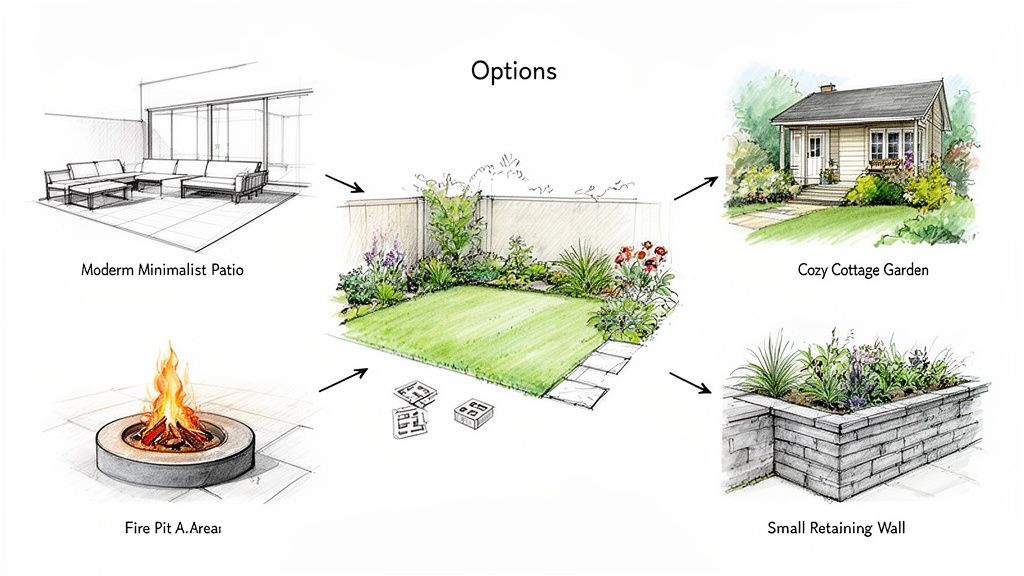
Alright, you've got your photo uploaded and ready to go. This is where the magic really happens—the creative explosion. You're about to move past just looking for inspiration and start building a whole portfolio of professional-looking landscape ideas, all tailored to your actual property. By applying AI landscape design to photos of your own yard, you can translate your personal taste into concepts you can actually see.
Think of it as translating your personal taste, whether that's a clean, modern vibe or a wild cottage garden, into concepts you can actually see. Modern AI tools are packed with a huge library of real-world plants, pavers, furniture, and structures. You get to play designer, layering them onto your photo and testing out combinations you might have never thought of on your own.
Using Your Photo as a Creative Launchpad
The real power here is how the AI uses your photo as a direct canvas. It’s not just pulling up generic pictures; it understands the scale, lighting, and existing features of your yard. This context is what makes the designs feel grounded and, more importantly, achievable.
For instance, let’s say you have a sloped front yard that’s been a headache for years. You can specifically ask the AI to tackle it using a photo of the area.
Prompt Idea: "Add a tiered retaining wall with stone pavers and low-maintenance shrubs to my sloped front yard."
What you'll get: The AI will instantly generate several versions of this idea right on your photo. You can see how different stone types or plant layouts would look against your house.
Or maybe you’re dreaming of a backyard upgrade.
Prompt Idea: "Visualize a circular paver patio with a modern black fire pit and four Adirondack chairs in the back corner of my yard."
What you'll get: You’ll get instant mockups, which let you judge the placement and scale without any of the usual guesswork.
The goal isn't just to land on one perfect design right away. It's about exploring dozens of possibilities, fast. This kind of rapid-fire brainstorming helps you sharpen your vision, discover new landscaping ideas, and feel way more confident in your final decision.
Exploring a World of Styles and Materials
The sheer number of options can feel like a lot, but good AI tools make it easy to manage. You can filter by style—from a Japanese Zen garden to a desert xeriscape—and apply those themes to your yard with a click. It’s like trying on completely new personalities for your home's exterior in just a few seconds.
This tech is booming for a reason: homeowners want unique outdoor spaces. The global landscape design software market was valued at a massive USD 5,261.5 million in 2024, with people like you and me driving that demand. We're all using these powerful tools to create custom plans, often with an eye on sustainability and creating better entertainment zones.
By playing with different materials on your photo, you can finally get answers to those nagging design questions:
Would dark slate pavers clash with my red brick house?
Does light-colored mulch or dark brown bark look better with my flower beds?
Should that new fence be traditional wood or a sleek black metal?
Each visualization you create gets you one step closer to a plan that looks and feels right. By seeing these changes on your actual property before you spend a dime, you eliminate costly mistakes and make sure the finished project is exactly what you had in mind.
Experience Your New Yard in Augmented Reality
A 2D design on your screen is a great starting point, but actually walking through your future yard? That’s a complete game-changer. This is where Augmented Reality (AR) steps in, bridging the gap between a digital concept and your physical space. Honestly, it’s one of the most exciting aspects of designing your yard online today.
AR technology takes those AI landscape design concepts you created using photos of your yard and projects them, true-to-scale, right into your actual space using just your phone's camera. This isn't some flat, pasted-on image; it's an immersive 3D experience that lets you see exactly how new features will fit before a single shovel hits the dirt.
Bringing Your Design to Life
Picture this: you’re standing on your back patio and you hold up your phone. Through the screen, a virtual pergola suddenly appears right over your head. You can walk around it, duck under it, and even see how its shadows might fall in the late afternoon sun. This powerful visualization tool removes almost all the guesswork from the design process.
You get to answer those critical questions with total confidence:
Is this patio going to be too big? Place the virtual pavers and see if you still have enough lawn space for the kids to run around.
Does that tree block our kitchen window view? Position a virtual Japanese maple in the corner, then walk inside and check the sightline yourself.
Will this fire pit feel cramped? Drop an AR model of the fire pit and a few chairs to instantly get a feel for the spacing and flow.
This is what gives you certainty. You’re no longer just hoping a design will work—you’re experiencing it in a tangible way, making sure every single element feels right in its real-world environment.
The biggest win with AR is its ability to nail down scale and placement. What looks perfect on a 2D image might feel oversized or just plain awkward in reality. AR previews let you catch these potential issues early, saving you from costly and frustrating mistakes down the line.
How to Use AR for Practical Checks
Getting started with AR is surprisingly straightforward. Once you’ve generated a design you like, you just switch over to the AR view mode in the app. The software then uses your phone’s camera to anchor the 3D model of your new yard right onto your existing one.
To really get the most out of it, move around. View the design from every possible angle. Stand by your back door, look out from an upstairs window, and walk the perimeter of the proposed changes. This process helps you truly understand how the new landscape will integrate with your home and surroundings. It transforms an abstract idea into a concrete plan you can move forward with.
You can explore a variety of these powerful AI and AR features to see just how intuitive the whole process has become.
Turning Your Digital Design Into a Real Project
A beautiful design on your screen is an incredible start, but the real fun begins when you figure out how to bring that vision to life. This is the moment your online yard design stops being just a cool idea and becomes a real blueprint for your budget, materials, and timeline.
Luckily, modern design tools don't just stop at pretty pictures. Many have built-in features that help you take those crucial next steps. One of the handiest is the ability to get instant area measurements right from the design you created on your photo. This means you can get a surprisingly accurate square footage for that new paver patio or the garden bed you’ve planned, all without ever pulling out a tape measure.
It’s a simple piece of data, but it’s the foundation for everything that comes next. With solid measurements in hand, you can start building a practical budget and a detailed shopping list.
From Pixels to Pavers: A Phased Approach
Breaking a big project into smaller, more manageable chunks can make the whole thing feel a lot less overwhelming. I've found that a logical way to tackle it is by separating the "hard" elements from the "soft" ones.
Phase 1: Hardscaping. This covers all the foundational stuff—patios, walkways, retaining walls, and decks. You want to get these installed first because the work is often messy and disruptive to the surrounding ground.
Phase 2: Planting and Softscaping. Once the heavy lifting is done, you can move on to the fun part: bringing in soil, planting your trees, shrubs, and flowers, and adding mulch. This is the finishing layer that really brings the design to life.
Sticking to this order keeps your project organized and, more importantly, ensures you're not planting a delicate new garden just to have it trampled during patio construction. As you move from planning to doing, it's also a great time to explore different backyard elements that will complete your landscape to make sure every detail is just right.
Communicating Your Vision With Professionals
Even if you’re a die-hard DIYer, some parts of a project might be better left to a professional contractor. This is where your detailed, AI-generated plan becomes your most powerful communication tool. Instead of trying to describe your vision with words, you can simply export and share the high-resolution images you created from the photos of your yard.
A clear visual plan ensures everyone is on the same page. It dramatically reduces misunderstandings and helps you get accurate, comparable quotes from contractors because they can see exactly what you want to achieve.
The infographic below shows just how simple the flow is from your initial concept to actually experiencing it in your yard.
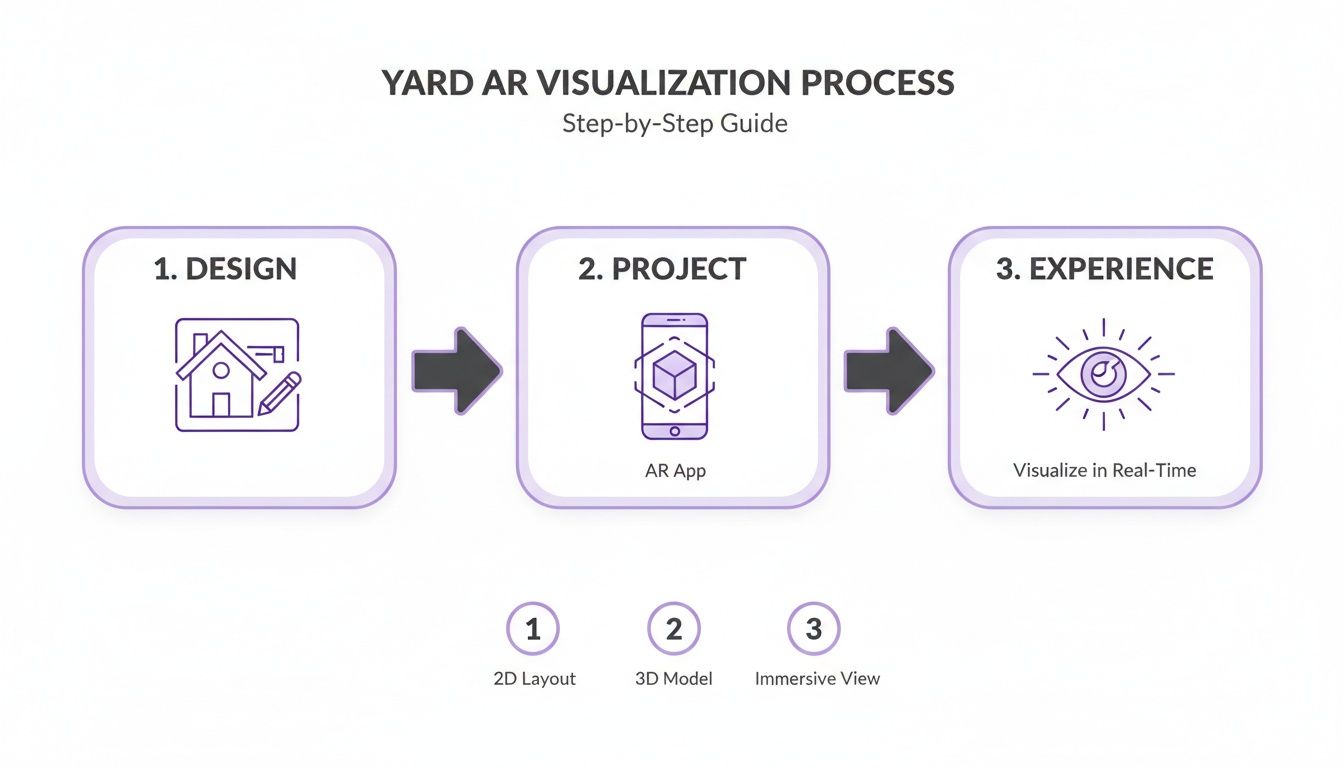
This process really highlights how a 2D design can be projected into reality, giving you a ton of confidence before a single shovel hits the dirt.
Before you lock in your budget, using a dedicated tool can give you some valuable perspective. You can get a solid starting point by checking out our landscaping cost estimator to see how your project lines up with regional averages. This helps ensure your online yard design is not just inspiring, but also financially realistic.
Common Questions About Yard Design Online
Jumping into the world of yard design online can feel like a big step, so it’s totally normal to have a few questions. I hear it all the time from homeowners: Can these new tools really deliver professional-looking results? Can they handle the weird slope or that awkward corner in my yard?
Let's tackle some of the most common questions I hear. My goal here is to demystify the process and show you just how powerful and practical these AI tools can be when you’re dreaming up a new outdoor space.
Can I Really Get a Professional Design from Just One Photo?
Yes, absolutely. It's amazing what you can get from a single snapshot of your yard. An advanced AI doesn't just "see" a picture; it analyzes the perspective, the lighting, and the scale of your space.
From there, it intelligently places plants, pavers, and hardscapes to create designs that look cohesive and natural—like they were always meant to be there. While these concepts aren't a substitute for an architect's detailed blueprints, they are the perfect starting point for homeowners. You can finalize layouts, pick out materials, and walk into a conversation with a contractor holding a clear, professional vision that was generated from a photo of your actual property.
How Accurate Are the AR Previews and Cost Estimates?
The Augmented Reality (AR) previews are incredibly helpful for getting a feel for scale and placement in your actual yard. When you project a virtual fire pit or pergola onto your lawn using your phone, you get a gut feeling for its size and how it changes the flow of the space. It moves from an idea to something tangible.
The cost estimates are designed to give you a solid ballpark figure to start your budgeting. They often pull from regional data for materials and labor to give you a realistic starting point.
But—and this is important—always treat them as estimates. You absolutely need to get detailed, firm quotes from local contractors. Things like specific site conditions, local material costs, and labor rates will always dictate the final price.
Will This Work for My Yard's Unique Challenges?
This is actually where AI design tools really shine. They are fantastic for brainstorming creative solutions for those problem spots we all have—steep slopes, awkward corners, or those narrow side yards that nobody knows what to do with.
Instead of seeing a problem, the AI sees an opportunity. You can feed it a photo of your trouble spot and get specific ideas.
Got a slope? Prompt it with something like: "Design a terraced garden on my sloped backyard using natural stone retaining walls and native grasses."
Stuck with a small space? Try this: "Show me small patio ideas for this narrow side yard with vertical planters."
By applying AI landscape design directly to a photo of your most challenging areas, you can visualize solutions you might never have thought of on your own. It's a great way to turn a frustrating part of your yard into a stunning feature.
For more detailed answers, you can find a comprehensive list of frequently asked questions on our site.
Ready to stop dreaming and start designing? DreamzAR AI Landscape Design lets you transform a single photo of your yard into countless professional concepts in seconds. See your vision come to life before you ever break ground. Download DreamzAR and get your instant yard makeover today!